UX RESEARCH → APP DESIGN
Syd.
Uni news tailored to first-year students: the essentials, when they need them, without the noise.
Scroll to playCHAPTER 00
Overview
Syd. started as team research into information overload among first-year students at USYD, then became my app concept. The process is documented in my design journal, from early sketches to a paper prototype, user feedback and the final screens.
- Research
- Team of four · 13 student interviews
- My part
- Interviews, journal process, app concept and UI
- Course
- DECO1006 Design Processes & Methods
- When
- Semester 1, 2026
CHAPTER 01
The problem
Commencing students are expected to navigate their first weeks using large volumes of information spread across many platforms. There's no shortage of information, but without clear, prioritised guidance it's hard to know what to do in the moment.
How might we deliver synchronised, just-in-time guidance that cuts through the noise and supports students when they need it most?
CHAPTER 02
Research
We interviewed 13 students from a range of courses and combined it with secondary research on information overload and the transition into university.
- 1 Cycle of disengagement Without clear hierarchy, students hit decision paralysis and ignore communications to save mental energy, so they miss critical messages.
- 2 Too early to matter Information that arrives weeks before it's relevant isn't retained, because it has no immediate use.
- 3 Over-informed, under-supported Students need in-time guidance and reminders, not more pages and notifications.
One student put it simply: "Everything appears in your inbox the same format."
CHAPTER 03
Ideation
In my journal I mapped how information reaches students, then explored directions including an AI chatbot that answers questions and an app that brings Canvas, Sydney Timetable and Unimail together.
CHAPTER 04
Prototype & feedback
I built a paper prototype, tested it with students and grouped the feedback through affinity mapping before moving to high fidelity.
CHAPTER 05
The app: Syd.
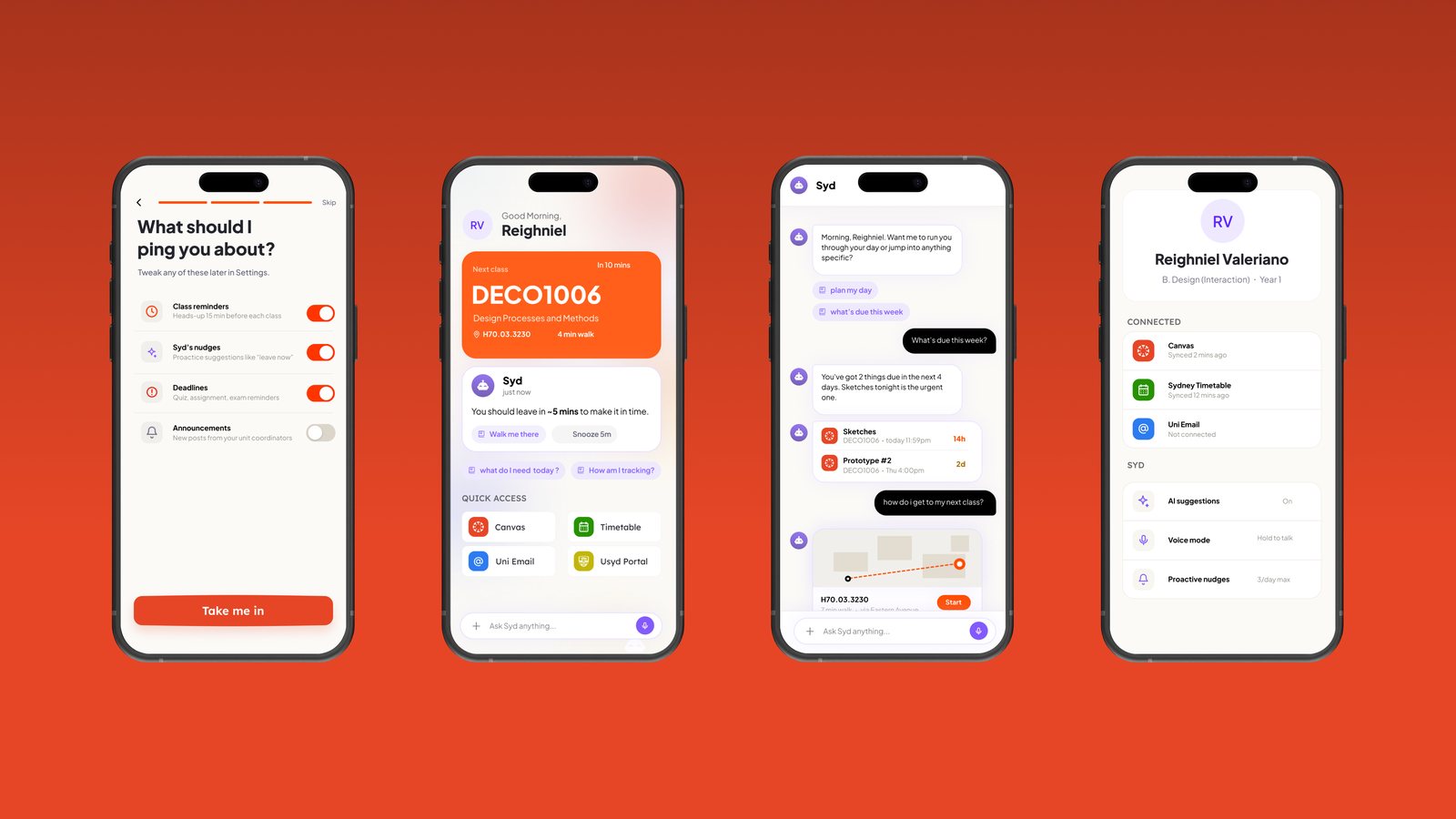
Syd. brings the most essential uni news to students when they need it, without the noise. Onboarding introduces Syd., connects existing accounts, and lets students choose what they're pinged about. The home feed, chat and profile keep everything in one place.
END OF CASE STUDY